


Barclays is one of the most common banks in UK lending, and their statements are probably the best looking of any UK bank. Clean layout, good typography, proper spacing. They look like someone actually designed them.

They also include a clear summary at the top:
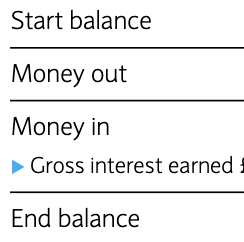
Start balance. Money out. Money in. End balance. Even gross interest earned. Everything you need at a glance.
But looks can be deceiving. Under the hood, Barclays statements have quirks that make them surprisingly tricky to parse — and those quirks can affect data accuracy in a lending pipeline if they're not handled correctly.
The Date Problem
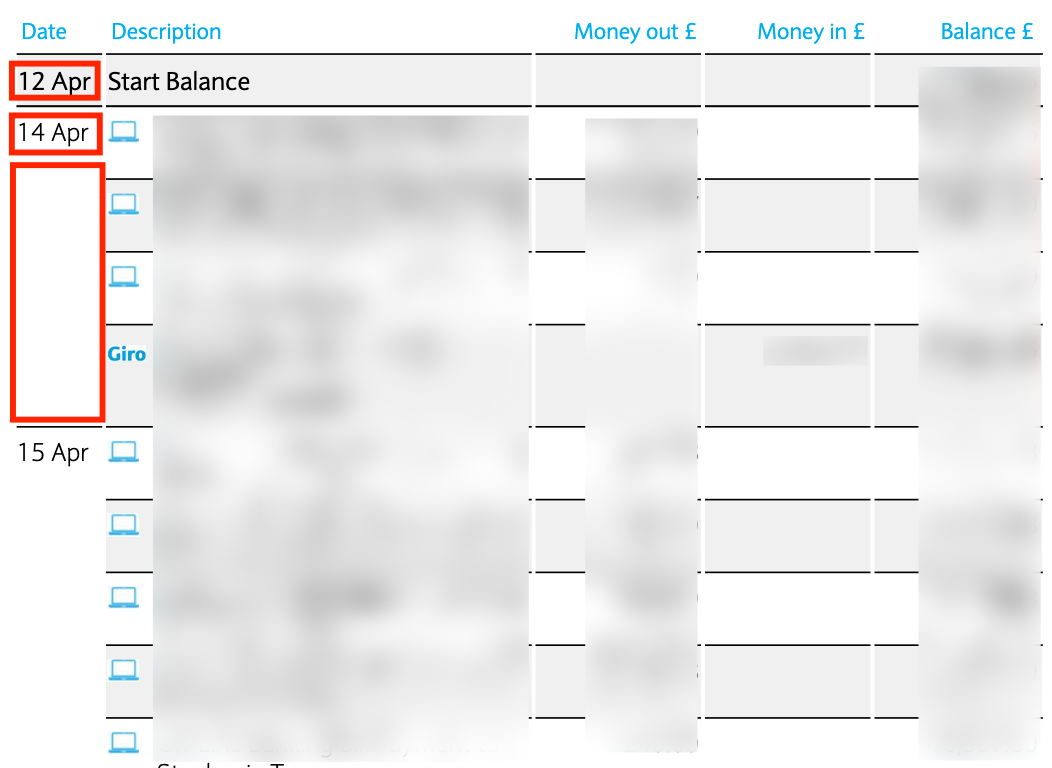
Look at those dates: "12 Apr", "14 Apr", "15 Apr". Notice anything missing? The year. Barclays dates don't include the year. Your brain fills in the gap, but a parser sees "12 Apr" and has to figure out whether that's 2024, 2025, or something else entirely.
And it gets worse. Not every transaction row even has a date. See how "12 Apr" appears once, then several transactions follow with blank date fields? Barclays only shows the date on the first transaction of each day. Five payments on the 14th? Only the first one shows "14 Apr". The other four have empty date cells.
For a human reading the statement, this makes sense — less visual clutter. For a parser, you need to extract the year from the statement header and carry dates forward until you hit a new one. Miss either of these, and you'll end up with dates that don't parse or transactions with no date at all. For lenders running time-based analysis — income regularity, spending patterns, seasonal trends — incorrect or missing dates undermine the entire assessment.
The Start Balance Problem
Page one of a Barclays statement begins with something like this:

"Start Balance" in the description column, a balance figure on the right, but no money in or money out. It's not a transaction — it's just telling you where the account stood at the beginning of the period.
What do you do with this when extracting to structured data? Include it and it skews transaction totals for anyone doing affordability analysis. Exclude it and you risk losing context. There's no perfect answer, but you need to handle it deliberately rather than just dumping everything into rows. ExactSum recognises these non-transaction rows and treats them appropriately in the output.
Balance Brought Forward
Similar issue on page two and beyond:

"Balance brought forward from previous page." Again, no date, no transaction amounts — just a running balance carried over from the previous page.
These balance-forward rows appear at the top of every page after the first. They're useful for someone reading the PDF page by page, but they're not transactions. A naive parser will include them as rows in your data, which skews totals and creates phantom entries in affordability calculations. For lenders processing high volumes, these errors compound across hundreds of statements.
Good Design, Hidden Complexity
The irony is that Barclays statements are so well designed for human reading that they're harder for machines to process. The missing years, the date grouping, the balance rows — these are all design decisions that make the PDF easier to scan visually.
But they create edge cases that trip up generic PDF extraction tools. You need Barclays-specific logic to handle them properly. ExactSum handles all of these Barclays-specific edge cases — because when you're making lending decisions based on extracted data, subtle parsing errors aren't just inconvenient, they're a risk.
Accurate Barclays Statement Analysis
ExactSum handles the date quirks, phantom balance rows, and every other Barclays-specific edge case automatically.
Book a Demo