


Bank of America is the second largest bank in the US. When lenders request credit card statements as part of affordability assessments, BofA statements appear frequently. Their credit card statements have a distinctive look - maroon headers, dotted leader lines, and a layout that packs a lot of information onto every page.

Credit card statements are a different beast from checking account statements. More fields, more sections, more things that can confuse a parser. For lenders who need accurate spending data for credit decisions, Bank of America's format presents some unique challenges.
The Two-Column Summary
Page one hits you with two dense sections side by side:
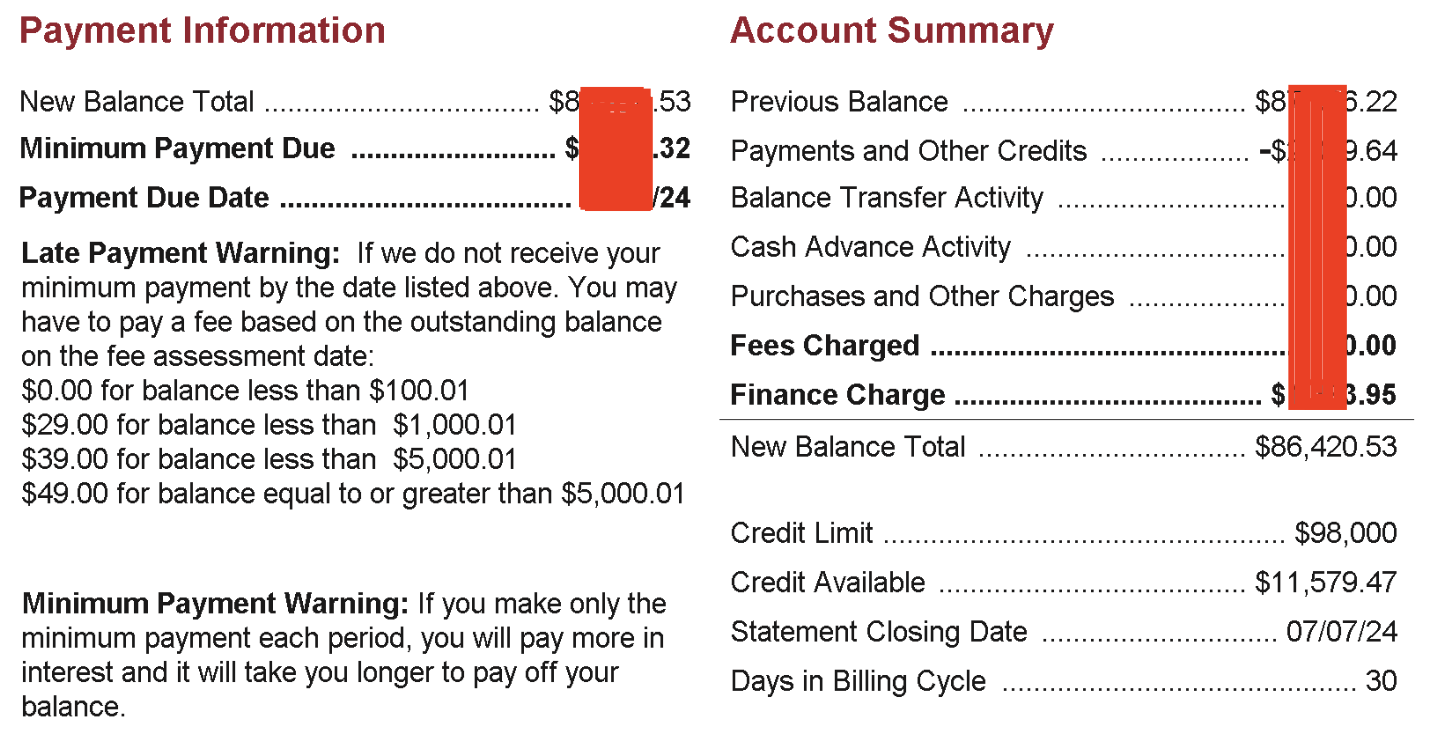
On the left: Payment Information. New Balance Total, Minimum Payment Due, Payment Due Date, and a Late Payment Warning with tiered fee amounts. On the right: Account Summary. Previous Balance, Payments and Other Credits, Balance Transfer Activity, Cash Advance Activity, Purchases and Other Charges, Fees Charged, Finance Charge, New Balance Total. Plus Credit Limit, Credit Available, Statement Closing Date, and Days in Billing Cycle.
That is over a dozen fields packed into a two-column layout with dotted leaders connecting labels to values. For a human, the dots guide your eye across. For a parser, two-column layouts are notoriously difficult. The text from the left column and the right column can interleave when extracted, jumbling Payment Information fields with Account Summary fields. You need to understand the spatial layout of the page, not just read the text top to bottom.
And notice the Late Payment Warning on the left - "$0.00 for balance less than $100.01", "$29.00 for balance less than $1,000.01". Those are dollar amounts that are not transactions and are not balances. They are conditional fee schedules printed right there in the summary area. For a lending team trying to extract actual spending patterns, these numbers are noise that needs to be filtered out.
Are Those Debits or Credits?
The transaction table looks straightforward enough:

Posting Date. Transaction Date. Description. Reference Number. Amount. Five columns.
But look at that Amount column. Just "Amount." Not "Debit" and "Credit." Not "Charges" and "Payments." One single column for everything. A purchase of $50 and a payment of $200 both appear in the same column. How do you tell them apart?
Bank of America uses a negative sign for credits - payments show as negative amounts. But if a parser strips the minus sign, or interprets it as a formatting artifact, every payment looks like a charge. On a credit card statement with thousands of dollars in both purchases and payments, getting the sign wrong means your totals will be wildly off. For a lender assessing an applicant's credit utilisation and repayment behaviour, this kind of error directly impacts the quality of the decision.
Then there are the two date columns. Posting Date is when the transaction hit the account. Transaction Date is when the purchase was actually made. They can be different - sometimes days apart. Which one matters for your affordability model? Most lenders want the transaction date for spending analysis, but some compliance workflows need the posting date. A robust parser needs to preserve both.
A Dispute Form in Your Statement
This one is genuinely unusual. Near the end of the statement, Bank of America includes this:
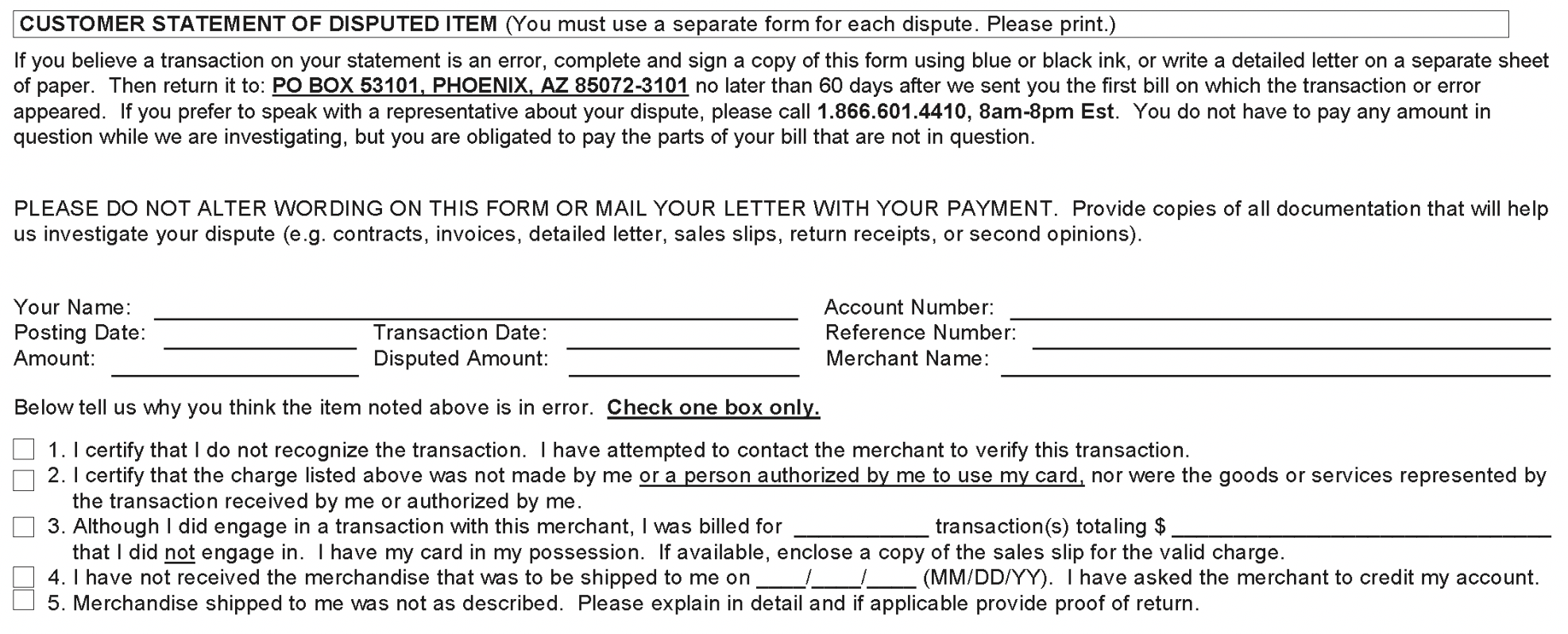
"CUSTOMER STATEMENT OF DISPUTED ITEM." It is a full dispute form - with checkboxes, blank lines to fill in, a mailing address, and numbered options like "I certify that the charge listed above was not made by me."
This is a paper form designed to be printed, filled out by hand, and mailed back. It lives in the statement PDF. A parser scanning every page for financial data will hit this and find field labels like "Amount:", "Posting Date:", "Transaction Date:" - the exact same words used in the actual transaction table. Without knowing this page is a form template, a parser could try to extract these as transaction data. For lenders processing hundreds of statements, this kind of false positive creates manual cleanup work that defeats the purpose of automation.
Finance Charges and APR Tables
The final pages include interest rate information:
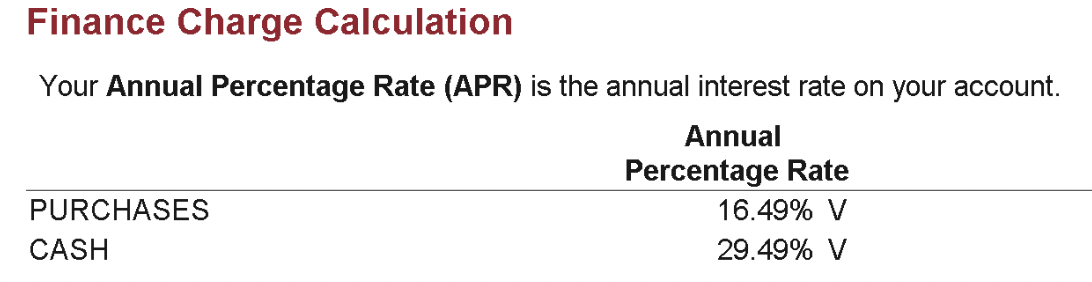
"Finance Charge Calculation." Annual Percentage Rates for Purchases (16.49% V) and Cash (29.49% V). The "V" means variable rate.
More structured data that is not transactions. More tables with numbers and labels that a generic extraction tool will try to process. And that "V" suffix after the percentages is similar to HSBC's "D" suffix for overdrafts - a single letter that changes the meaning of the number, and that most parsers will either ignore or misinterpret.
Why Credit Card Statements Are Harder for Lenders
Checking account statements are relatively straightforward - money in, money out, running balance. Credit card statements add layers of complexity. Payment due dates, minimum payments, credit limits, APR calculations, finance charges, dispute procedures. All of this lives alongside the transactions in the same PDF.
Bank of America's format packs all of these into a dense, two-column layout with a single ambiguous Amount column and pages of non-transaction content. For lenders who rely on credit card data to assess applicant spending patterns and repayment behaviour, parsing it correctly means understanding the full structure of a credit card statement - not just finding a table and extracting rows.
ExactSum's BofA-specific parsing handles all of these edge cases. The two-column summary is correctly separated. Negative amounts are properly identified as credits. The dispute form is skipped. APR tables are filtered out. What your team receives is clean, accurate transaction data ready for affordability analysis.
Dealing with Credit Card Statements in Lending?
ExactSum extracts clean transaction data from Bank of America and other credit card formats, so your analysts can focus on the decision.
Book a Demo